
References and transformed results
Two names can refer to the same collection
When a computer processes data, that data is stored in a part of the computer's memory. In Python, variables in reality principally store a reference to that memory location, not the data itself.
For primitives such as numbers and strings, every modification replaces the entire object with an object stored elsewhere, so this detail does not matter:
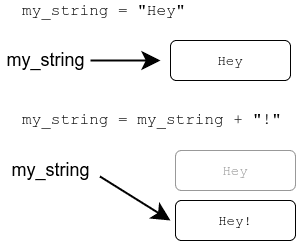
This means for example that after:
a = "Hey"
b = a + "!"
a continues to refer to the original string "Hey", while b refers to a different memory address storing the string "Hey!".
For more complex multipart objects such as lists however, most modifications happen in place within the memory occupied by the object, to which multiple variables can (continue to) refer:
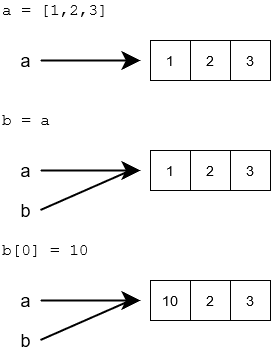
Notice how here, after b[0] = 10, also a now equals [10, 2, 3], in contrast to the string example above.
This has implications for data work: by default, most modifications to complex objects happen in place. If a function receives a list and modifies it, the caller will see the change. When this is not desired, the code must explicitly ensure that transformations create new copies instead of modifying the original.
Shallow copies and nested data
With nested structures, it is also important to distinguish between shallow and deep copies.
For example, by default, a slice of a list creates a new list, but any complex objects inside the list are still shared. This is called a shallow copy:
original = ["art", "history"]
copied = original[:]
copied.append("music")

print(original)
print(copied)

records = [
    {"title": "Object A", "metrics": {"views": 12}},
    {"title": "Object B", "metrics": {"views": 8}}
]

copied_records = records[:]
copied_records.append({"title": "Object C", "metrics": {"views": 5}})
copied_records[0]["metrics"]["views"] = 99

print(records)
print(copied_records)['art', 'history'] ['art', 'history', 'music']
[{'title': 'Object A', 'metrics': {'views': 99}}, {'title': 'Object B', 'metrics': {'views': 8}}] [{'title': 'Object A', 'metrics': {'views': 99}}, {'title': 'Object B', 'metrics': {'views': 8}}, {'title': 'Object C', 'metrics': {'views': 5}}]
In both cases, the outer list was copied into new memory, but in the case where the list contained more complex objects, those still referred to the same memory locations. Thus, while adding Object C to the copied list did not affect the original list, changing the views of Object A in the second list also affected that record in the original list.
To create fully distinct copies of a nested structure, you thus need to explicitly copy every level of the structure. Python provides many mechanisms to do this in different scenarios when it is needed, but for now, it is enough to just be aware of this distinction, and how it can be used to achieve a desired behaviour, and how forgetting it can lead to unexpected results.
In-place changes and returned transformations
A function may deliberately change the object it receives:
def add_label_in_place(labels: list, label: str):
    labels.append(label)

labels = ["art"]
add_label_in_place(labels, "history")
print(labels)
Alternatively, it can construct and return a new result:
def with_added_label(labels: list, label: str) -> list:
    result = labels[:]
    result.append(label)
    return result

labels = ["art"]
new_labels = with_added_label(labels, "history")

print(labels)
print(new_labels)['art'] ['art', 'history']
A practical default
When reading or reviewing a data transformation, check three things:
- Does the function change its input or return a new result?
- Are any inner lists or dictionaries shared between records?
- Does the observed result match the function's stated contract?
These questions are especially useful when inspecting code written by an agent. A transformation can look correct for one record while accidental sharing corrupts a larger dataset.
You can check your current points from the blue blob in the bottom-right corner of the page.